Steps
- Drag the video onto the window, or use File › Open. MP4, MKV, MOV, AVI, WMV, WebM, FLV, MPEG, TS and many more are recognized.
- The first time, the program may prepare its FFmpeg component. This needs an internet connection once.
- The soundtrack opens as a waveform. Cut out the parts you don’t need.
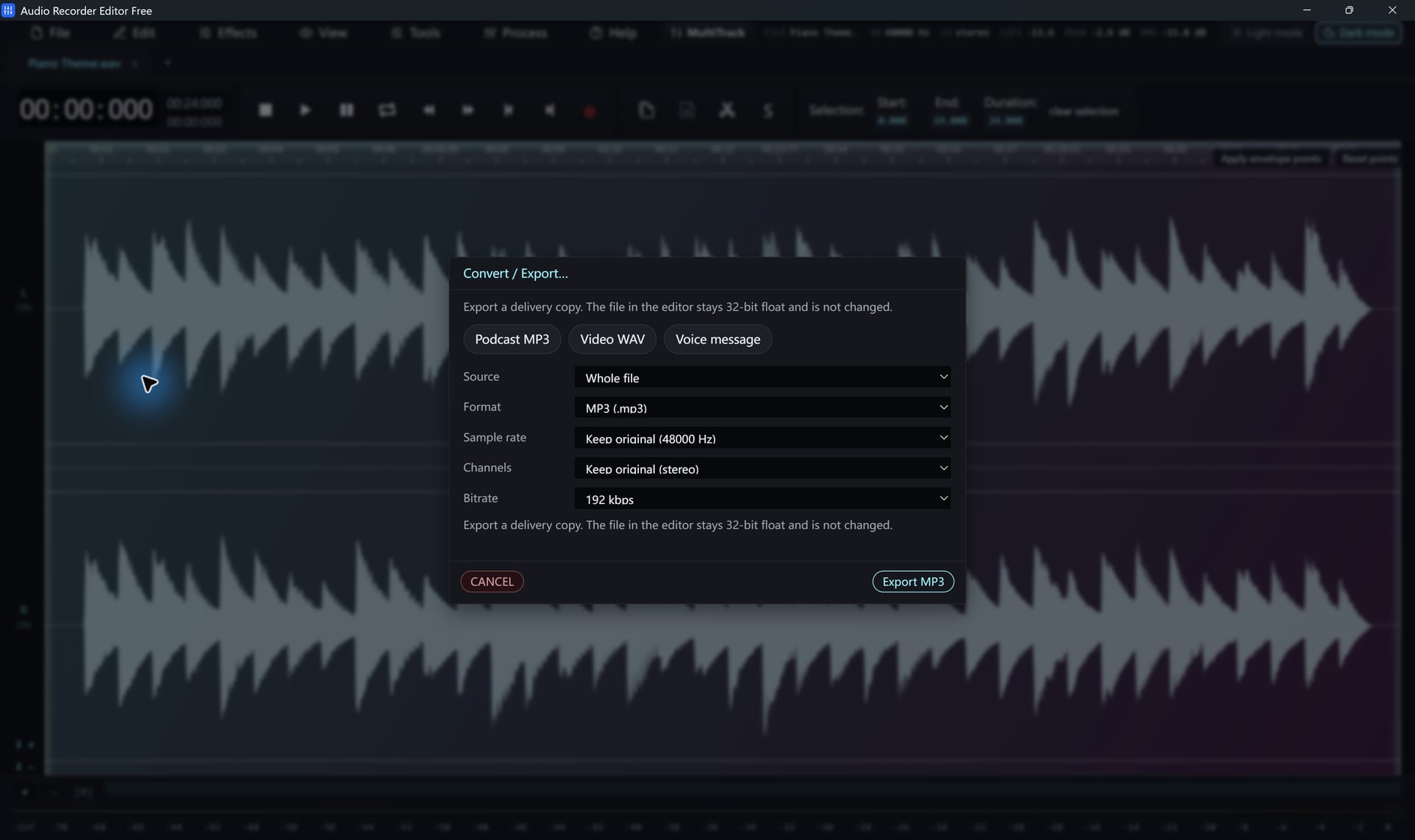
- Choose Convert / Export, pick MP3, WAV, FLAC or M4A and save.
Only the audio is used. The program does not edit or export video pictures.
Settings that matter
- Most videos use 48 kHz audio. Keep the source rate unless you need 44.1 kHz for music players.
- For speech, MP3 at 128 kbps is plenty. For music, use 256 kbps or more.
- To convert many videos at once, use the batch converter.
Follow along for freeAudio Recorder Editor Free has every tool in this tutorial. No registration.
Free DownloadQuestions about this task
Can it extract audio from a DRM-protected video?
No. Protected files cannot be decoded.
A video won’t open. Why?
The file may use an unusual codec. Recognizing an extension does not guarantee every codec inside it can be decoded.
Try It On Your Own Audio
Audio Recorder Editor Free costs nothing. Install it and follow along.
Download Free for WindowsFree forever · Windows 11 & 10 (64-bit) · No registration